Travel creates small moments when a dog can slip away: a car door opens at a rest stop, hotel staff enters unexpectedly, or a rental gate does not latch. A GPS dog tracker for travel adds location awareness during those moments when it is prepared before departure and used as one part of a broader safety system.
A connected tracker can show location, send escape alerts, and support a faster response when conditions allow. It cannot contain a dog, replace a leash, guarantee an exact position everywhere, or substitute for identification and a registered microchip.
This guide focuses specifically on setting up and using a GPS tracker on a trip. For transportation, documents, veterinary preparation, lodging, and destination planning, use our complete dog travel safety guide alongside it.
Quick Answer: Is a GPS Dog Tracker Worth Using for Travel?
For many dogs, yes—especially with unfamiliar lodging, frequent vehicle stops, hiking, camping, crowded spaces, or a dog with a history of bolting. It gives the owner another way to detect an escape and search in the right area.
The safest approach is layered:
- A secure leash or restraint prevents many escapes.
- An ID tag and registered microchip support reunification.
- A connected GPS tracker provides location data and alerts when supported service is available.
- A recent photo and local contact plan help if technology fails.
No single layer is perfect. Together, they reduce the number of ways one mistake can become a prolonged search.
Why Travel Raises a Dog’s Escape Risk
Dogs rely on familiar routines and cues. On vacation, doors, smells, sleeping arrangements, walking routes, people, and noise all change. Even a dog that never leaves home may react differently.
The highest-risk moments are often transitions. Watch closely when you:
- Load or unload the vehicle.
- Stop for fuel, food, or bathroom breaks.
- Enter a hotel lobby, elevator, parking garage, or rental home.
- Open a campsite tent, RV, patio, or balcony door.
- Meet staff, hosts, or other guests.
- Walk near fireworks, wildlife, crowds, or traffic.
Attach and activate the tracker before the first travel transition. Waiting until arrival leaves the entire journey unprotected.
What a Travel GPS Tracker Can—and Cannot—Do
A connected pet tracker combines satellite positioning with a mobile connection. Satellite reception helps determine position; supported network service delivers updates to your phone.
GPS is not perfectly precise. GPS.gov notes that buildings, bridges, trees, indoor spaces, reflected signals, atmospheric conditions, and receiver quality can reduce accuracy. Dense woods, parking garages, tall buildings, and hotel interiors may produce slower or less stable positions.
A tracker can help you:
- View a recent or live location when the device is connected.
- Receive an app alert after a dog leaves a configured boundary.
- Review location history to understand direction of travel.
- Use device-specific tools such as a light or voice feature.
It cannot:
- Stop a dog at the edge of a map.
- Guarantee instant alerts.
- Replace physical restraint in an unsecured area.
- Guarantee tracking during a flight or in a no-service zone.
- Replace veterinary care, training, supervision, identification, or a microchip.
Treat the map as decision support, not an invisible leash.
Set Up the Tracker Before You Leave
Set the device up several days early so you can solve fit, charging, notification, or coverage problems at home.
1. Confirm the Device and Plan Are Active
Verify that the tracker is online, the account is current, and any required telecom plan is active. For cross-border travel, check coverage for every destination and transit country. “International coverage” does not guarantee every route or remote location.
2. Check Fit and Attachment
The tracker should stay secure without creating pressure points or restricting breathing. Follow fit instructions, inspect clips or straps, and use the collar or harness configuration that remains stable and comfortable.
Keep a separate physical ID tag with your current mobile number. Do not depend on the electronic device as the only identification attached to your dog.
3. Enable the Right Phone Permissions
Enable required notifications, location permissions, mobile data, and background activity. Test alert volume in realistic conditions.
If shared access is supported, add a trusted traveler. Decide who watches the map and who handles the leash during a search.
4. Practice With the App
Walk a familiar route, observe updates, and trigger a boundary alert under controlled conditions. Practice switching modes, reading history, and using light or voice tools.

Create Useful Temporary Boundaries
A temporary GPS boundary can warn you that your dog has left an area around a rental, campsite, or other destination. A simple boundary is usually easiest to interpret.
Place the digital edge thoughtfully. Because GPS positions can shift, drawing it against a road, water hazard, cliff, or property line leaves no response buffer. Test it on leash to learn local alert behavior.
Know what your product does. With SATELLAI Collar Go, crossing a virtual boundary sends a push notification to the app. It does not automatically deliver sound, vibration, or static correction. The alert tells the owner to act; it does not contain the dog.
At rentals and campsites:
- Inspect physical gates, screens, doors, tie-outs, and fences first.
- Keep the dog leashed unless the area is permitted and physically secure.
- Ask companions and staff to announce before opening exterior doors.
- Test the boundary after arrival because local signal conditions differ from home.
- Recreate or disable temporary boundaries when you change locations to avoid confusing alerts.

Build a Travel Charging Plan
A tracker with an empty battery cannot send connected updates. Start each day with enough charge for the route; do not assume advertised maximum runtime will match your use.
Power use changes with tracking mode, update frequency, signal conditions, temperature, and device age. Live tracking usually consumes more power, and weak coverage can affect performance.
Pack the correct cable, wall adapter, and a charged power bank. Check the tracker at night and before the first morning walk. If it must be removed to charge, keep the dog indoors, crated, or supervised until it is reattached.
Keep charging gear in the dog’s accessible travel kit, not buried in luggage.
Use GPS Safely During Road Trips
At each stop, connect the leash inside the closed car, confirm your grip, then open the door. On return, close the dog inside before detaching anything.
GPS does not protect a dog in a collision. Use an appropriate carrier or restraint and never attach a vehicle tether in a way that loads the tracker or neck.
Use a fixed leash near traffic. Check the app only after the dog is secure; screen distraction can create an escape opportunity.
Understand the Limits of Air Travel Tracking
Do not assume continuous in-flight location. Airline rules, aircraft structure, network availability, and battery requirements affect whether a tracker may remain attached or connected.
Ask whether the specific model and battery are permitted on the animal or carrier. Follow airline instructions if it must be powered off or removed. Review FAA battery guidance and the airline’s rules.
For a flight, permanent identification matters even more. The American Veterinary Medical Association recommends keeping microchip registration and contact information current. Add a secure carrier label and follow all required animal documentation procedures.
Run an Arrival Safety Check
Before giving your dog freedom inside a new space, one adult should remain responsible for the leash while another inspects the room or property. Check balcony gaps, loose screens, yard gates, damaged fencing, hiding spaces, trash, medications, and doors that staff may use.
Then open the tracking app and confirm that the device is communicating at the destination. Walk a short, calm route on leash to learn where the entrance, relief area, parking lot, and nearest high-risk roads are. Create the temporary boundary only after you understand the physical layout.
Save the address and phone numbers for a nearby veterinarian, emergency clinic, local animal control agency, and lodging desk. Download an offline map if your phone supports it, because a lost-dog response should not depend on one app or one network.
Build a Nighttime Safety Routine
Night walks in an unfamiliar area add low visibility, traffic, wildlife, and navigation challenges. Use reflective gear and a flashlight, stay on known paths, and keep the leash attached. A controllable collar light can make the dog easier for you and nearby drivers to see, but it does not replace illumination or reflective equipment.
Return before the tracker or phone reaches a critically low battery. In cold weather, watch battery levels more closely, and after rain or swimming, inspect and dry the tracker according to its care instructions even if it is water resistant.

What to Do If Your Dog Gets Loose While Traveling
Move quickly, but do not run blindly after a frightened dog. Chasing can push some dogs farther away or toward traffic.
- Secure doors, other pets, and traffic hazards if you can do so without losing sight of the dog.
- Open the tracker app and note the last update time, direction, and location. Switch to the manufacturer’s recommended live mode if the device is connected and battery level permits.
- Use a calm recall cue. If your tracker has two-way or prerecorded audio, use a familiar cue only if you practiced it before the trip. A speaker cannot guarantee recall.
- Coordinate trusted helpers. Share clear screenshots or approved location access; do not post sensitive live lodging information publicly.
- Call local resources. Notify the lodging desk, animal control, nearby shelters, veterinary clinics, and the microchip registry. Provide a current photo and your mobile number.
- Search the last reliable area safely. Bring a leash, high-value food, and familiar bedding. Watch roads, water, hiding places, and routes back to the lodging.
If the map stops updating, continue the conventional search. A timestamped last known location is a starting point, not proof that the dog remains there.
Using SATELLAI Collar Go as a Travel Tracker
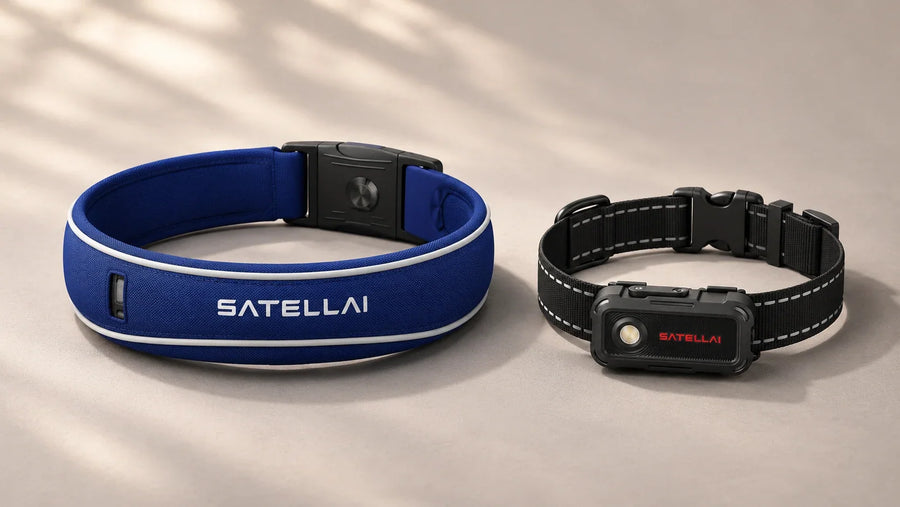
The SATELLAI Collar Go is positioned for everyday tracking, walks, and trips. It is a lightweight 1.7-ounce GPS tracker compatible with a dog collar or harness and includes live GPS tracking, customizable virtual boundaries with escape alerts, location history, Doggie-Talkie, an adjustable safety light, activity and health insights, a built-in NFC ID tag, and IP68 water and dust resistance.
Those features map well to travel needs: temporary boundaries can support arrival monitoring, location history can provide direction during a search, the light can improve nighttime visibility, and the NFC tag gives a finder another route to contact information.
Use the features within their limits. Full connected functionality requires an active SATELLAI telecom plan and supported coverage. Collar Go boundaries provide owner alerts rather than automatic feedback to the dog. Activity and health insights can help you notice routine changes, but they are not a diagnosis or a substitute for veterinary care.
GPS Dog Tracker Travel Checklist
Before leaving, confirm that you have:
- Updated ID tag and microchip contact information.
- Tracker paired, updated, charged, and attached securely.
- Active account or telecom plan for connected features.
- Coverage information checked for the route and destination.
- App permissions and escape notifications enabled.
- A tested temporary boundary strategy.
- Charger, wall adapter, and portable power bank.
- Fixed leash, backup leash, carrier, or vehicle restraint.
- Recent dog photos and emergency contact numbers.
- A second plan for no-service or low-battery situations.
Travel With Better Awareness, Not False Certainty
A GPS dog tracker for travel is most valuable when it shortens the time between an escape and an informed response. It works best when the owner understands coverage, keeps the battery charged, tests alerts, and uses the device before high-risk transitions begin.
The goal is not to create a portable invisible yard. It is to build a practical safety stack: supervision first, physical restraint whenever needed, current identification, a registered microchip, and connected tracking as an additional layer. That approach gives you useful information without asking one device to do more than it can.
Frequently Asked Questions
Does a GPS dog tracker work without cell service?
The device may still receive satellite signals, but most connected pet trackers need supported cellular or network service to send current location data and alerts to your phone. In a no-service area, updates may be delayed or unavailable. Check the manufacturer’s coverage information and carry a non-digital lost-dog plan.
Can a virtual boundary keep my dog inside a rental or campsite?
No. A virtual boundary is not a physical barrier. On Collar Go, crossing the boundary sends an app notification to the owner; it does not automatically correct or contain the dog. Use a leash, secure enclosure, direct supervision, and properly closed gates.
Can I track my dog during a flight?
Do not count on continuous in-flight tracking. Connectivity may be unavailable, and the airline may restrict whether a particular tracker or battery can remain attached or powered on. Ask the airline about your exact device before travel and follow its instructions.
How often should I charge a dog GPS tracker while traveling?
Check the battery at least each morning and evening, and charge before it becomes low. Live tracking, weak signals, temperature, and frequent updates can increase power use. Pack the correct cable and a portable power source rather than relying only on the advertised maximum runtime.
Can a GPS tracker replace a microchip, ID tag, or leash?
No. A tracker can lose power, connectivity, or attachment. Keep a legible ID tag on your dog, maintain current microchip registration, and use a leash or secure enclosure wherever required. GPS is an additional recovery tool, not a replacement for identification or physical safety.